
C1000-178 Cognos Analytics v12 Administrator: Syllabus, Exam Format and Practice Test Plan
C1000-178 is the IBM exam behind the IBM Certified Cognos Analytics v12 Administrator - Professional credential. It has 60 questions in 90 minutes, needs a score of 73% to pass and carries a US$200 fee (October 2026 pricing). It covers installation, security, content management, performance tuning and recovery of a Cognos Analytics 12 environment.
If you already look after a Cognos server and want proof of it, the fastest way to measure your readiness is a timed run through the C1000-178 practice test, which mirrors the 60-question, 90-minute format and shows which of the five syllabus areas you lose marks in. The rest of this guide walks through each of those areas, the scenarios IBM likes to build questions around, and an eight-week plan that fits around a full-time job.

Who is the C1000-178 certification written for?
The credential is aimed at the person who keeps a Cognos Analytics installation running for everyone else. That usually means a BI platform administrator, a middleware or application server engineer who inherited Cognos, or a reporting lead in a smaller company who installs, secures and patches the product alongside writing reports. IBM files it under its Data, Analytics, and AI certification category, at the Professional level, which signals that the questions assume hands-on time rather than classroom knowledge.
Report authors and dashboard designers are not the target audience, even though they use the same portal. Very little of the exam asks how to build a list report or a visualisation. Instead, it asks what happens underneath when that report runs: which service picks up the request, which query engine executes it, where the output is stored, who is allowed to see it, and what to check when it fails at three in the morning inside a scheduled job.
Employers value the certificate for a practical reason. Cognos environments tend to live for many years, pass between teams, and accumulate folders, schedules, data source connections and security exceptions that nobody fully remembers. An administrator who can describe the platform end to end, and recover it after a failed upgrade, reduces a risk that most BI managers know they carry.
How is the C1000-178 exam structured, and what score do you need?
The exam is delivered through Pearson VUE. The figures below are the ones IBM publishes for this version of the test, as recorded in October 2026. Check the IBM certification page for C1000-178 before booking, because IBM revises fees by region and occasionally refreshes the question pool when a new release of the product ships.
| Item | C1000-178 figure |
|---|---|
| Certification | IBM Certified Cognos Analytics v12 Administrator - Professional |
| Exam code | C1000-178 |
| Product version | Cognos Analytics v12 |
| Number of questions | 60 |
| Time allowed | 90 minutes |
| Passing score | 73% |
| Fee | US$200, October 2026 price |
Ninety minutes for 60 questions gives you an average of 90 seconds per question. That is comfortable for short recall items and tight for the longer scenario questions that describe an environment, a symptom and four possible fixes. A sensible pace is to finish a first pass in about 65 minutes, flagging anything that needs a second read, and keep the remaining time for the flagged items.
A 73% pass mark is higher than many IBM professional exams. If every question carried equal weight, it would mean answering roughly 44 of the 60 correctly, so you can afford around 16 mistakes across the whole paper. That margin disappears quickly if one of the two largest areas is weak, which is why the weightings matter more than they first appear to.
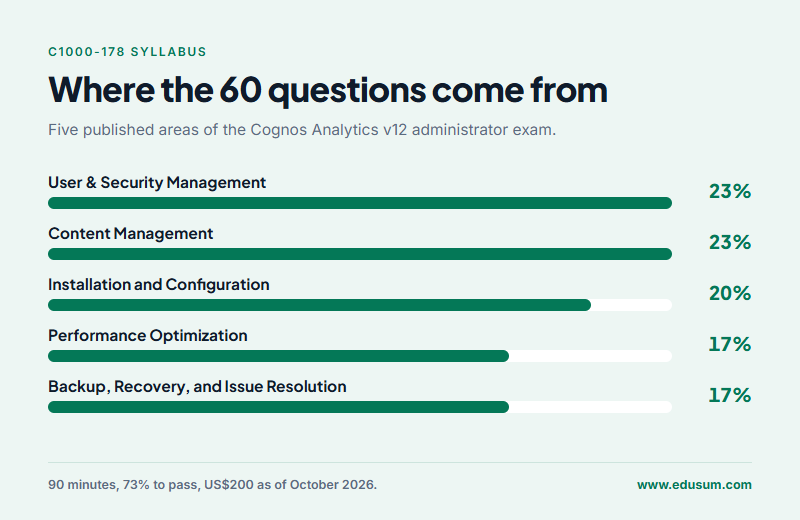
The C1000-178 syllabus page lists five areas. Converted to approximate question counts on a 60-question paper, they look like this:
| Syllabus area | Weight | Approx. questions |
|---|---|---|
| Installation and Configuration | 20% | 12 |
| User & Security Management | 23% | 14 |
| Content Management | 23% | 14 |
| Performance Optimization | 17% | 10 |
| Backup, Recovery, and Issue Resolution | 17% | 10 |
What does the Installation and Configuration area (20%) expect you to know?
This area checks that you understand how the product is assembled before you touch any of it. Expect questions on the main Cognos components: the gateway or web server tier that receives browser requests, the application tier where dispatchers route work to services such as the report, batch report and query services, and the Content Manager that reads and writes the content store database. You should be able to say which component a given symptom points to, for example a portal that loads but cannot open any saved object.
Single server or distributed, GUI or silent
The syllabus names three installation choices. A single-server install places every component on one machine and suits test systems or small departments. A distributed install separates the web tier, application tier and Content Manager across servers so each can scale or fail over on its own. On top of that, the installer runs either interactively or silently from a response file, which is how teams repeat the same build on many Windows or Linux hosts without clicking through each screen.
The configuration folder and its XML files
Cognos Configuration saves its settings to cogstartup.xml in the configuration folder of the installation, and that folder also holds sample and logging templates you copy and edit rather than change in place. Questions here tend to test whether you know which changes belong in the Cognos Configuration tool, which are made by editing a file, and why hand-editing the main startup file while the service is running is a bad idea.
Failover Content Manager, web server and mobile access
For resilience, you install Content Manager on more than one server, point them at the same content store, and let one act as the active instance while the others wait on standby. You should know what triggers a standby to take over and which settings must match across all Content Manager machines. The same area covers configuring a web server such as IIS or Apache HTTP Server in front of Cognos, connecting to an authentication provider such as LDAP, Active Directory or OpenID Connect, enabling access for the Cognos mobile app, and upgrading an existing installation to version 12 without losing content.
Why do security and content management decide almost half the score?
User & Security Management and Content Management carry 23% each, so together they account for 46% of the paper, roughly 28 of the 60 items. Both areas are where everyday administration happens, and both produce the scenario questions that are hardest to answer from reading alone, because the right option depends on how several permission and folder rules interact.
User & Security Management (23% weight)
Cognos never stores passwords for external users. Authentication comes from the provider you configured, and authorisation comes from the Cognos namespace, which holds the built-in groups and roles such as System Administrators and Everyone, plus any groups and roles you create. A common exam pattern describes a user who can sign in but cannot see a folder or a feature, and asks whether the cause is namespace membership, a missing capability or an object permission.
Capabilities control what a person can do in the product, such as using the administration pages, scheduling, or creating data modules. Object permissions control what they can do to a specific folder, report or connection: read, write, execute, set policy and traverse. Remember that an explicit deny wins over any grant, and that permissions flow down from a parent folder unless a child object overrides them. UI profiles add one more layer, deciding which authoring interface and features each role is shown.
The syllabus also asks you to plan an object and content security strategy. In practice that means securing through groups and roles rather than individual users, keeping the number of overridden folders small, and documenting which group owns each top-level folder in Team content, so that the next administrator can audit access without opening every object.
Content Management (23% weight)
This half of the pair is about the objects that users create. You will need to know how to secure Team content and its child folders, how to run content maintenance tasks that find and fix inconsistencies in the content store, and how to monitor scheduled activities, including suspending, cancelling and reviewing past runs when a batch job misbehaves.
Connections are a frequent topic. Data source connections and data server connections describe how Cognos reaches a database, which credentials it uses, and which query mode can use them. Know where each type is managed, how signons are stored, and how to test a connection before handing it to report authors. The customization objective covers themes, extensions and default home pages that change the portal's appearance for some or all users.
How does the Performance Optimization area (17%) test dispatchers and query modes?
Every request in Cognos passes through a dispatcher, which hands it to the service that can process it. The exam expects you to monitor dispatcher and service status from the administration pages, and to tune them: the number of processes and connections a report service may use, separate settings for peak and non-peak periods, and how batch work can be pushed to dedicated servers so interactive users are not slowed down by overnight bursting.
Advanced configuration settings are name and value pairs set at the dispatcher or service level for behaviour that has no checkbox in the interface. You do not need to memorise long lists of them, but you should know where they are entered, that some require a service restart, and that a mistyped value is often ignored silently, which turns a tuning change into a troubleshooting session.
Auditing belongs here as well. Cognos can write usage and activity to an audit database, at logging levels that run from minimal to full detail per service. Administrators use it to see which reports are heavily used, which never run, and who changed what. The trade-off the exam likes is overhead: the most detailed levels help diagnosis but cost performance on a busy system.
Finally, be clear on the difference between the two query engines. Compatible Query Mode (CQM) is the older engine kept for legacy packages. Dynamic Query Mode (DQM) runs in the Java-based query service, connects through JDBC, caches results, and is required for data modules. Questions often describe a slow or failing report and ask which mode it runs in, or what changes when a package is moved from CQM to DQM.
Which recovery and troubleshooting scenarios appear in the last 17%?
Backup in Cognos has two halves. The content store can be exported to a deployment archive from the administration pages, encrypted with a password, and imported again on the same or another environment. The database that holds the content store should also be backed up with the database vendor's tools, and the configuration folder, including its cryptographic keys, needs a copy as well, because restored content is unreadable without matching keys.
Issue resolution questions usually start from a symptom: a report that runs fine for one user and fails for another, a schedule that produces no output, or a service that will not start after a configuration change. You are expected to separate problems caused by the server, such as an overloaded service or a dropped database connection, from problems inside a report specification, and to know which logs and administration views tell you which one you are dealing with.
The Interactive Performance Assistant (IPA) is named explicitly. Once it is made available, a report author can run a report with performance details shown, and each object on the page displays how long it took to query and render. For an administrator, that turns a vague complaint about a slow report into a specific list or chart to investigate, and it separates a slow query from a slow page layout.
Does IBM offer an official practice test for C1000-178?
IBM publishes the exam objectives and links to its own training on the certification page, and from time to time offers its own assessment exams for certifications. Availability changes, so check IBM's page for what is currently offered with C1000-178. The training named alongside the exam includes IBM Cognos Analytics 12: Overview of Dashboards (B7370G and J5370G) and IBM Cognos Analytics 12: Modeling with Data Modules (B7320G and J5320G).
EduSum's practice test is not an IBM product and is not official. What it does offer is volume and feedback: questions written to the five syllabus areas, timed to the real 90-minute limit, with a result broken down by area so you can see whether security or performance is costing you marks. Use it as a measuring tool after you have worked through the product, not as a substitute for hands-on time.
Hands-on time matters more for this exam than for most. If your employer does not have a spare server, a small virtual machine with a trial of IBM Cognos Analytics, a local database for the content store and a directory service for authentication is enough to practise installation, security, backup and restore end to end.
How should you prepare for C1000-178 in eight weeks?
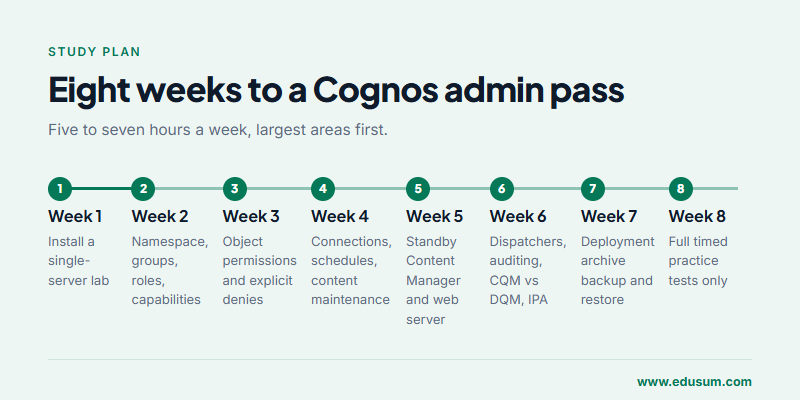
The plan below assumes five to seven hours a week and some existing exposure to Cognos. It front-loads the two 23% areas, because they hold the most marks, and leaves the final week for timed practice only. If you have never installed the product, add a week at the start to build the lab.
- Week 1, build and install. Install a single-server environment, connect a content store database, open Cognos Configuration and read every section of it once.
- Week 2, security model. Connect an authentication provider, create groups and roles in the Cognos namespace, and test capabilities against two different users.
- Week 3, object permissions. Build a Team content structure, apply and override permissions, add an explicit deny, and predict the result before you test it.
- Week 4, content. Create data server connections, schedule reports, watch them in the activities view, and run a content maintenance task.
- Week 5, distributed setup. Add a second Content Manager on standby, place a web server in front, and stop the active Content Manager to watch failover.
- Week 6, performance. Change dispatcher settings, enable auditing at two levels, compare a report in CQM and DQM, and run it with IPA details.
- Week 7, recovery. Export the content store to a deployment archive, break something on purpose, restore it, and read the logs that record the failure.
- Week 8, timed practice. Two or three full 60-question practice tests at the real time limit. Trace every miss back to its syllabus objective.
Mistakes that cost candidates marks
The first is studying the reporting tools instead of the platform. Many people who use Cognos daily know the authoring interface well and assume that is enough. It is not: the exam hardly touches report design and spends most of its questions on what runs underneath.
The second is treating permissions as obvious. Inheritance, explicit denies, capabilities and UI profiles combine in ways that are easy to misread under time pressure. Drawing the folder tree and writing the effective permission for each group, before choosing an answer, avoids most of these errors.
The third is skipping recovery practice because it feels like a rare event. Backup, restore and troubleshooting carry 17% of the paper, about ten questions, and they are the quickest marks to earn for anyone who has actually restored a content store once in a lab.
The last is booking the exam before your practice scores are stable. Aim to score comfortably above 73% on two consecutive timed attempts, each with a fresh set of questions, before you schedule the real sitting with Pearson VUE.
Frequently Asked Questions
How long is the C1000-178 exam, and how many items does it contain?
You get 90 minutes to answer 60 questions, close to a minute and a half for each one. Leave time at the end to revisit the longer scenario questions you flagged on the first pass.
What score do I need to pass C1000-178?
IBM sets the passing score at 73%. On a 60-question exam that means roughly 44 correct answers if every item counts equally, so you can miss about 16 questions and still pass.
What does it cost to sit C1000-178?
IBM lists the fee at US$200 in October 2026. IBM can price exams differently by country and may change fees, so confirm the amount on IBM's certification page or when you book through Pearson VUE.
Which C1000-178 syllabus areas carry the most weight?
User and Security Management and Content Management are the largest, at 23% each. Installation and Configuration is 20%, while Performance Optimization and Backup, Recovery and Issue Resolution are 17% each. Plan your study hours in roughly the same proportions.
Do I need hands-on Cognos experience before taking C1000-178?
IBM does not require a prerequisite certification, but every question is written for someone who has installed, secured and maintained Cognos Analytics yourself. A small lab where you can break and restore the content store is the most useful preparation you can add.
Is the C1000-178 exam about building reports and dashboards?
Only slightly. The exam focuses on administering the platform: components, authentication, permissions, schedules, connections, dispatchers, query modes, auditing and recovery. Report authors who never manage the server usually find it harder than they expect.
- IBM Certification |
- IBM Data Analytics and AI Certification |
- IBM Certified Cognos Analytics v12 Administrator - Professional |
- C1000-178 Cognos Analytics Administrator Professional |
- C1000-178 Online Test |
- C1000-178 Questions |
- C1000-178 Quiz |
- C1000-178 |
- IBM Cognos Analytics Administrator Professional Certification |
- Cognos Analytics Administrator Professional Practice Test |
- Cognos Analytics Administrator Professional Study Guide |
- IBM C1000-178 Question Bank |
- Cognos Analytics Administrator Professional Certification Mock Test |
- Cognos Analytics Administrator Professional Simulator |
- Cognos Analytics Administrator Professional Mock Exam |
- IBM Cognos Analytics Administrator Professional Questions |
- Cognos Analytics Administrator Professional |
- IBM Cognos Analytics Administrator Professional Practice Test |
- C1000-178 Syllabus |
- Cognos Analytics Administrator Professional Books |
- Cognos Analytics Administrator Professional Certification Syllabus |
- IBM C1000-178 Books |
- IBM Cognos Analytics Administrator Professional Training


