
Certified GitHub Enterprise Administrator: Syllabus, Skills and Study Plan
A GitHub Enterprise administrator runs the platform an organisation's developers build on: who can sign in, what each person can reach, which automation is allowed to run and how code stays secure. Microsoft certifies this job through its GitHub Administration credential, an intermediate exam aimed at administrators, DevOps engineers and technology managers.
The credential is examined as GH-100: 100 minutes, 65 questions and a scaled score of 700 out of 1000 to pass. Sitting it in the United States costs US$99 as of September 2026; Microsoft sets the fee by the country where the exam is proctored, so check the price at checkout. Before you book, the free GitHub Administration sample questions show the scenario style you will face, and the rest of this guide explains the job, the five skill areas and a six-week plan to get ready.

What does a GitHub Enterprise administrator actually do?
Most of the work is governance at scale. A developer who owns one repository decides its branch protection and its collaborators. An enterprise administrator decides those things for hundreds of organisations and thousands of repositories at once, through policies that individual owners cannot quietly override. The job exists because a setting that is harmless in one repository becomes a risk when it is repeated across an entire company.
A typical week mixes four kinds of task. Identity work comes first: connecting the company's identity provider, making sure a leaver loses access the same day, and mapping directory groups to GitHub teams. Policy work follows: which repository visibility is allowed, who may create organisations, which marketplace actions a workflow may call. Then security operations, where the administrator switches on secret scanning and code scanning, decides who triages the alerts and writes the response plan for a leaked credential. Finally there is reporting, because finance wants to know why the seat count grew and why Actions minutes doubled last quarter.
The role sits between three teams that rarely share a vocabulary. Developers want fewer obstacles, the security team wants more controls, and operations wants runners that do not fall over at release time. A good administrator translates between them and expresses the agreed compromise as configuration, not as an email everybody forgets. That is why Microsoft lists Administrator, DevOps Engineer and Technology Manager as the target roles for this certification rather than developer alone.
It is also a role with a clear boundary. The administrator fixes what the enterprise controls: membership, permissions, policies, runners, secrets, audit streams. Platform defects, service incidents and some account problems belong to GitHub Support. Knowing which side of that line a problem falls on, and collecting the right diagnostics before opening a ticket, is a skill the exam tests directly.
Which GitHub Enterprise deployment will you run, and why does it change the answers?
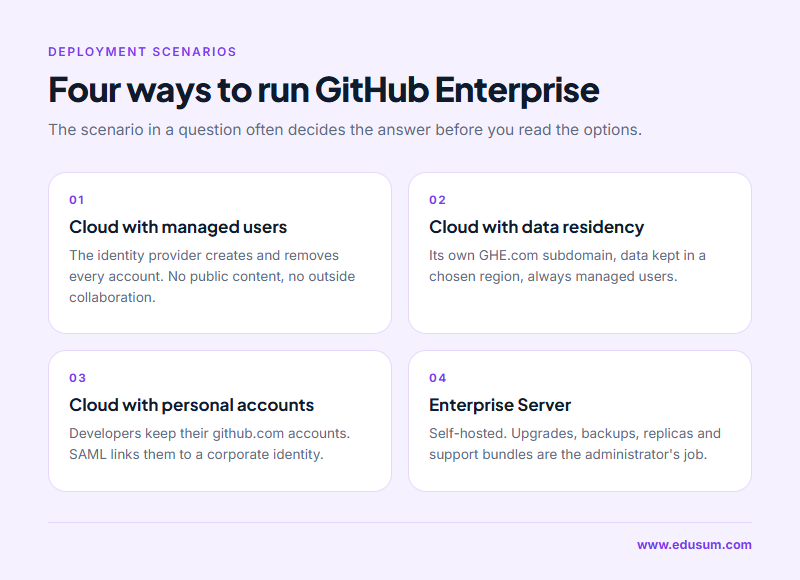
The study guide names four deployment scenarios, and many exam questions only have one right answer once you know which scenario the question describes. Read every scenario question twice: the words managed users, data residency or server usually decide the answer before you reach the options.
Enterprise Cloud with Enterprise Managed Users
With Enterprise Managed Users, the company's identity provider creates, updates and removes every account through SCIM. People do not bring their own GitHub account; their username carries the enterprise's short code as a suffix, and they cannot create public content or collaborate outside the enterprise. Authentication happens at the identity provider, so questions about enforcing two-factor authentication for managed users are usually a trap: that control lives in the identity provider, not in GitHub.
Enterprise Cloud with data residency and managed users
This variant runs on its own GHE.com subdomain, with the enterprise's data stored in the region the company chose. It always uses managed users. The administrator's practical concern is that some features and integrations arrive later or behave differently here, and that network allow lists and tooling must point at the dedicated subdomain rather than at github.com.
Enterprise Cloud with personal accounts
Here developers keep their own github.com accounts and join the company's organisations. The enterprise can require SAML single sign-on, which links each personal account to a corporate identity before it can reach company resources. SCIM can be added to remove organisation access when someone leaves, but the personal account itself survives, because the company never owned it.
Enterprise Server
GitHub Enterprise Server is the self-hosted product, installed on infrastructure the company runs. Everything the cloud handles silently becomes the administrator's job: upgrades, backups, high-availability replicas, storage and the management console. Support bundles and diagnostics matter most here, because GitHub Support cannot see inside an instance they do not host.
Licensing follows the same split. Enterprise Cloud charges per consumed seat, where one person in five organisations still counts once, while Server uses a license file uploaded to the instance. Metered products such as Actions minutes, Packages storage, Codespaces and the Advanced Security products are billed on usage on top of seats, and the exam expects you to read those usage reports and recommend where to cut waste.
How is the GitHub Administration exam built, timed and scored?
The exam is proctored and delivered by Pearson VUE, either at a test centre or online from home or the office. It is offered in English only; the study guide notes that candidates sitting an exam that is not available in their preferred language can request extra time. The questions are scenario-based and can include interactive components, so reading speed matters as much as recall.
| Detail | GitHub Administration exam |
|---|---|
| Exam code | GH-100 |
| Level | Intermediate |
| Duration | 100 minutes |
| Number of questions | 65 |
| Passing score | 700 out of 1000 |
| Fee | US$99 in the United States as of September 2026; varies by country |
| Language | English |
| Validity | 2 years |

A score of 700 is a scaled result, not a percentage. Microsoft weights questions differently, so 700 does not mean you must answer exactly 70% correctly, and calculating a safe number of mistakes during the exam wastes time you do not have. Aim to be comfortably ready in every area instead of relying on the largest one.
If the first attempt fails, Microsoft's retake policy allows a second attempt 24 hours later, with longer waiting periods for any attempt after that. The certification is valid for two years. GitHub is moving its certifications onto Microsoft's renewal process, which will let holders stay current without sitting the full exam again, and certifications that would expire before that process is available are being extended by six months.
Before exam day, launch the exam sandbox linked from the Microsoft Learn GitHub Administration certification page. It reproduces the interface and question types, so the first time you see a drag-and-drop or multi-part item is not the moment it counts.
What does each of the five skill areas test in practice?
Microsoft rewrote the skills measured in July 2026, rewording every objective and moving several between groups, so preparation material written for the earlier outline may put topics in the wrong place. The five current areas and their published weightings are below, heaviest first. Treat each percentage as a guide to how much study time an area deserves.
Implement secure software development and compliance: 25 to 30%
This is the heaviest area and the one that separates an administrator from a developer. It covers organisation and enterprise policies, audit logging and reporting, and the repository security features: vulnerability alerts, secret scanning, CodeQL code scanning, Dependabot and security advisories. Expect questions that ask which feature solves a stated problem. A leaked cloud key calls for secret scanning with push protection; a vulnerable package version calls for Dependabot alerts and security updates; an injection flaw in the company's own code calls for code scanning.
The same area covers API access. You need to know the difference between classic and fine-grained personal access tokens, how an organisation can require approval for fine-grained tokens or restrict classic ones, and why a GitHub App is usually preferred over an OAuth App for automation: the App acts as itself with narrowly scoped permissions and short-lived installation tokens, while an OAuth App acts on behalf of a user. Rate limits appear here too, as a reason to move heavy integrations from personal tokens to Apps. The final objective, a security response plan, asks you to decide in advance who is told, who rotates the secret and who reviews the audit log when something leaks.
Manage GitHub Actions: 20 to 25%
This area is about controlling automation rather than writing it. The core decisions are which actions may run (all, only those inside the enterprise, or a selected list such as GitHub-authored and verified creators), how reusable workflows and internal actions are shared across the enterprise, and how organisation policies for Actions are applied. Knowing workflow syntax helps, but the questions are framed as policy choices.
Runners carry the most detail. You should be able to explain when GitHub-hosted runners are enough and when self-hosted runners are justified, how runner groups limit which organisations and repositories can use a runner, and how IP allow lists and Azure private networking let hosted runners reach private resources. Secrets complete the area: their scope at repository, environment and organisation level, which repositories an organisation secret is shared with, and how OpenID Connect lets a workflow fetch credentials from a third-party vault instead of storing long-lived keys in GitHub at all.
Manage GitHub identities and access: 15 to 20%
Identity questions reward precise vocabulary. SAML single sign-on authenticates a person. SCIM provisions and deprovisions accounts. Team synchronisation keeps a GitHub team's membership in line with a group in the identity provider. Managed users and personal accounts behave differently under each of these, and the study guide asks you to choose and configure an identity provider, not only to define the terms.
Access and permissions make up the other half: organisation roles such as owner, member, billing manager and security manager; repository roles from read through triage, write and maintain to admin; custom roles; enterprise teams; and rulesets that enforce branch and tag rules consistently. Auditing who has access to what, and why, is part of the objective, so know where the enterprise and organisation audit logs live and what they record.
Administer the GitHub Enterprise environment: 10 to 15%
This area joins two different skills. The first is supporting users: recognising which issues an administrator can resolve and which need GitHub Support, generating support bundles and diagnostics, and recommending standards for branching, reviews and releases so teams stop inventing their own. The second is deployment and licensing, covered earlier in this guide: the four deployment scenarios, the billing models, and monitoring how licences are consumed.
Monitor and optimise GitHub usage: 10 to 15%
The last area treats the enterprise as something to measure. You analyse audit logs and API usage, study usage patterns to spot features the company pays for but barely uses, and read the usage reports for metered products. The optimisation objective asks for recommendations: removing dormant seats, moving long jobs to cheaper runners, or trimming artifact and package retention that silently fills storage.
Which area catches out experienced developers most often?
Candidates who come from development usually find Actions familiar and identity hard. They have written workflows for years but have never configured SCIM, never had to decide between managed users and personal accounts, and never seen an enterprise policy from the other side. Their second weak spot is billing and licensing, which developers rarely touch and which the exam treats as ordinary administrative work.
Candidates from infrastructure or security backgrounds tend to have the opposite profile. Identity providers and audit logging feel natural, but reusable workflows, runner groups and secret scopes need deliberate study. Whichever group you belong to, these are the mistakes that cost the most marks:
- Treating SAML and SCIM as the same thing. One signs a person in, the other creates and removes the account.
- Assuming an organisation owner can loosen a setting the enterprise has locked. Enterprise policy wins.
- Choosing a personal access token where a GitHub App is the safer, better-scoped answer.
- Storing a cloud credential as a secret when the scenario hints at OpenID Connect and a vault.
- Answering a Server question with a cloud-only feature, or the reverse.
- Opening a support ticket for something the administrator can fix, or trying to fix a platform fault that only GitHub Support can resolve.
The pattern behind all six is the same: the exam describes a situation, and the right answer depends on one detail inside it. Practise by underlining the deployment type, the actor and the constraint in each question before you look at the options.
Does Microsoft offer an official practice test for GitHub Administration?
Yes. Microsoft publishes a free practice assessment for this certification on Microsoft Learn, alongside the exam sandbox and two self-paced learning paths, GitHub Administration Part 1 of 2 and Part 2 of 2. Those are Microsoft's official materials, and every candidate should use them, because they come from the people who write the exam and follow the current skills outline.
EduSum's practice test is a separate, independent resource and is not an official Microsoft product. Its purpose is volume and timing: full-length timed attempts mapped to the five skill areas, with a score breakdown that shows which area is holding you back. Microsoft's practice assessment tells you what the questions look like; repeated timed practice tells you whether you can finish 65 of them in 100 minutes without rushing the last twenty.
Be cautious with anything sold as real exam questions. Such material breaks the exam agreement you accept before the test, is often wrong, and teaches recall of answers rather than the reasoning that scenario questions demand. Genuine practice questions written against the published objectives are both safer and more useful.
How can you prepare in six weeks alongside a full-time job?
Six weeks at five to seven hours a week suits someone who already uses GitHub at work. Start with the official GH-100 study guide and print the objectives, then tick each one only when you have configured it yourself, not when you have merely read about it.
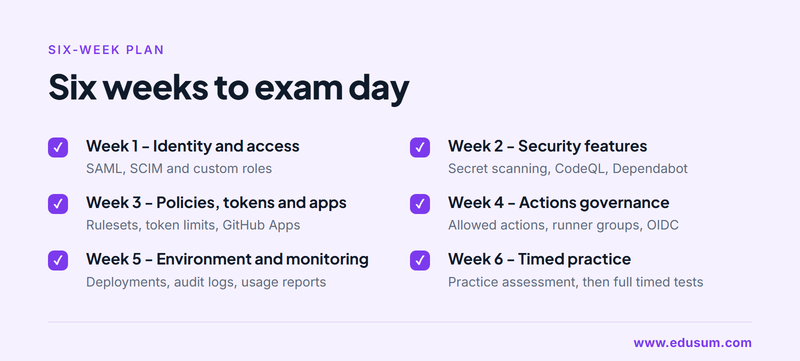
Week 1: identity and access. Set up a trial enterprise or use a sandbox organisation your employer provides. Configure SAML single sign-on against a test identity provider, read how SCIM provisioning differs for managed users, and create custom repository and organisation roles.
Week 2: security features. Enable secret scanning with push protection, run CodeQL on a sample repository, turn on Dependabot alerts and security updates, and draft a one-page response plan for a leaked token. This is the heaviest area, so give it a full week.
Week 3: policies, tokens and apps. Apply enterprise and organisation policies, build a ruleset, restrict classic personal access tokens, and install a GitHub App to compare its permissions with an OAuth App's scopes.
Week 4: Actions governance. Restrict allowed actions, share a reusable workflow across organisations, register a self-hosted runner in a runner group, and replace a stored cloud secret with an OpenID Connect login.
Week 5: environment and monitoring. Compare the four deployment scenarios on paper, export and read an audit log, open the usage and licence reports, and list three savings you would recommend.
Week 6: timed practice. Take Microsoft's practice assessment, then sit full timed practice tests. Review every wrong answer back to its objective and revisit that objective in the lab before the next attempt.
If a trial enterprise is not available to you, a free organisation still covers a surprising amount: roles, rulesets, Actions policies, secrets and most security features on public repositories. Use documentation and the learning paths for the enterprise-only pieces such as managed users and enterprise policies, and give them extra review time because you cannot practise them hands-on.
Where does the GitHub Administration certification lead in your career?
The credential fits people who already own, or want to own, a company's source control platform. Typical titles include GitHub administrator, platform engineer, DevOps engineer, developer experience engineer and DevSecOps engineer. In each, the certification is evidence that you can be trusted with enterprise-wide settings, which is a different claim from being a strong individual developer.
Demand is driven by consolidation and security. Companies moving from other source control systems onto GitHub need someone to design organisations, map permissions and migrate repositories, and GitHub provides the GitHub Enterprise Importer for exactly that work. Companies already on GitHub are under pressure to prove who can reach their code and how secrets are protected, which turns audit logs, rulesets and secret scanning into daily responsibilities rather than optional extras.
The certification also sits inside a wider GitHub family. GitHub Foundations covers the basics, GitHub Actions goes deeper into workflow authoring, GitHub Advanced Security focuses on code and secret protection, and GitHub Copilot covers the AI assistant. An administrator who adds the Advanced Security or Actions credential later has a coherent story for a platform or security engineering role, and one who pairs it with Azure DevOps or cloud certifications can cover the full path from commit to production.
Whatever route you take, the value comes from the hands-on work behind the badge. Configure each objective at least once, keep notes on the decisions and their trade-offs, and you will arrive at the exam able to reason through scenarios instead of recalling answers, which is also what the job asks of you on a normal Monday.
Frequently Asked Questions
Who should take the GitHub Administration exam?
It is designed for system administrators, application administrators, software developers and IT professionals with intermediate experience of administering GitHub Enterprise. Candidates should already manage identities, GitHub Actions, governance and security features such as GitHub Advanced Security on Enterprise Cloud or Server.
How many questions are on the GitHub Administration exam and how long is it?
The exam has 65 questions and you get 100 minutes to complete it. It is proctored through Pearson VUE, offered in English, and can include interactive question types alongside multiple choice, so try the Microsoft exam sandbox before test day.
What score do I need to pass the GitHub Administration certification?
You need a scaled score of 700 out of 1000. Because the score is scaled and questions can carry different weights, 700 is not the same as answering 70 percent correctly, so prepare evenly across all five skill areas.
How much does the GitHub Administration exam cost?
The fee is US$99 when the exam is taken in the United States, as of September 2026. Microsoft prices the exam according to the country or region where it is proctored, so the amount shown at checkout in Pearson VUE is the one that applies to you.
How long is the GitHub Administration certification valid?
GitHub certifications are valid for two years. GitHub is moving to Microsoft's renewal process so holders can stay certified without retaking the full exam, and certifications expiring before that process launches receive a six-month extension.
Can I retake the GitHub Administration exam if I fail?
Yes. Microsoft allows a retake 24 hours after a first unsuccessful attempt. Waiting periods grow for further attempts, and the full rules are in Microsoft's exam retake policy. Use the score report to target the weakest skill area before booking again.
- Microsoft Certification |
- Microsoft GitHub Certification |
- Microsoft GitHub Administration |
- GH-100 GitHub Administration |
- GH-100 Online Test |
- GH-100 Questions |
- GH-100 Quiz |
- GH-100 |
- Microsoft GitHub Administration Certification |
- GitHub Administration Practice Test |
- GitHub Administration Study Guide |
- Microsoft GH-100 Question Bank |
- GitHub Administration Certification Mock Test |
- GitHub Administration Simulator |
- GitHub Administration Mock Exam |
- Microsoft GitHub Administration Questions |
- GitHub Administration |
- Microsoft GitHub Administration Practice Test |
- GH-100 Syllabus |
- GitHub Administration Books |
- GitHub Administration Certification Syllabus |
- Microsoft GH-100 Books |
- Microsoft GitHub Administration Training |
- GitHub Administration Certification Cost |
- Microsoft GitHub Administration Books |
- GitHub Administration Sample Questions |
- Microsoft GH-100 Practice Test Free |
- GitHub Administration Certification Sample Questions


