
Adobe Workfront Project Manager Certification: Syllabus, Career Value and Practice Test Plan
The Adobe Workfront Project Manager Certified Professional credential proves you can take work from a request to a closed project inside Workfront: triage what comes in, build a realistic timeline, assign people, track dates and money, and close out cleanly. It is a Professional-level exam for business practitioners, not for developers or system administrators.
Adobe examines it as AD0-E911: 50 questions in 100 minutes, with 33 correct answers needed to pass and a fee of US$125 as of October 2026. The three exam sections follow a project's life, so this guide does the same. It walks through the job, the format, each section of the syllabus, the preparation that works and where the badge takes you. To see the question style first, open the free Workfront Project Manager sample questions.

What does a project manager actually do inside Workfront?
A Workfront project manager spends less time drawing plans than a traditional scheduler and more time keeping one shared record honest. Requests arrive through queues instead of inboxes. Plans live as projects whose tasks carry owners, hours and dates. Status comes from the system because people update their own work, so the manager's skill is knowing which number to trust and which setting produced it.
The working day usually moves through four activities. First comes intake: reading new requests, checking the custom form fields the requester filled in and deciding whether each one becomes a task, a project or a polite refusal. Second is planning, where a template is turned into a timeline with durations, predecessors and constraints. Third is execution, which means balancing workloads, chasing approvals, reviewing proofs and explaining to stakeholders why a date moved. Last is closeout, where the project's status changes and its results are compared with the plan.
Workfront is used heavily by marketing, creative and IT teams, and by project management offices that run many similar projects at once. That shapes the role. A campaign manager at an agency, a traffic manager routing creative work, a PMO analyst reporting on a portfolio and an IT project lead all do the same things in the tool, even though their job titles differ. The certification is aimed at every one of them: people who manage work in Workfront daily but do not configure the system itself.
That boundary matters for the exam. Setting up access levels, building milestone paths or creating custom forms is an administrator's job. The project manager is expected to use those things correctly: to pick the right milestone path for a project, to read a custom form on a request, to recognise when a sharing permission is not enough for what a colleague needs to do. Questions are written from that seat, so answer them as the person running the project, not the person who owns the instance.
How is the exam built, scored and booked?
Adobe lists the exam under the Adobe Workfront application, at Professional level, for the Business Practitioners job role, with a time limit shown as one hour and forty minutes. You answer 50 questions and need 33 of them right. That works out to two minutes a question and room for 17 wrong answers, a margin that is generous only if you do not spend it all in one section.
| Detail | Workfront Project Manager exam |
|---|---|
| Exam code | AD0-E911 |
| Certification | Adobe Workfront Project Manager Certified Professional |
| Level and role | Professional, Business Practitioners |
| Number of questions | 50 |
| Duration | 100 minutes |
| Passing score | 33 out of 50 |
| Fee | US$125 as of October 2026 |
| Sections | Intake and planning 40%, Execute 50%, Closeout 10% |
The exam is taken online with remote proctoring and booked through the Adobe certification portal exam page. Adobe lets you schedule an appointment up to 60 days ahead. Before the portal will let you pick a slot you must install its Process Tracker software and pass a System Check that validates your device, browser and permissions, so do this on the computer and network you will really use, not on a work laptop with a locked-down firewall the night before.
The rescheduling rules are worth knowing because they cost money when ignored. You may move the appointment free of charge until 24 hours before it starts; inside that window Adobe charges a five-dollar fee. Cancelling more than 24 hours ahead keeps your voucher, while cancelling later forfeits it. Requests for accommodations must be made at least 7 days before the appointment.
On the day, the Take exam button appears a few minutes before the start time and opens the proctoring dashboard. You accept the Adobe Candidate Agreement, let the system capture a current photo ID that shows your legal name, take a headshot and record a short video of the room. You then share your whole screen and stay in full screen mode. Both AI and human proctors watch the session, and closing the browser, ending the screen share or covering the camera ends the exam.
Once you hold the credential, Adobe's portal says most of its certifications can be renewed for two years at no cost by passing two short renewal modules of about a quarter of an hour each, instead of sitting the full exam again. Check the renewal status in your portal account, because the rule is stated for most certifications, not all.
What does the Intake and planning section (40%) expect you to know?
Intake and planning carries 40% of the exam, which is roughly 20 of the 50 questions. It has nine objectives, and they fall into three groups: receiving a request, deciding who can do what, and building the plan.
Receiving and reading a request
In Workfront a request is an issue submitted to a request queue, which is a project published so that people can send work to it. Queue topics and routing rules decide which custom form the requester sees and which person, team or project receives the result. The first objective asks how you find out that a request has arrived, and there are several correct channels: an email notification, the notification bell inside Workfront, your Home work list, your team's requests list, and a report or dashboard built on issues. Expect a scenario that describes a team's habits and asks which channel fits.
The second objective is about reading the custom data on that request and choosing the right action. A custom form might capture budget, launch date, audience or asset type. Those answers tell you whether to convert the issue to a task inside an existing project, convert it to a new project from a template, reassign it or send it back for more detail. When you convert, Workfront can carry the custom form data across and keep the original issue linked, so the requester still sees progress on what they asked for.
Sharing, hierarchy and finding data
Sharing questions separate two ideas that sound alike. An access level is assigned to a user by an administrator and sets the ceiling on what that person can ever do with each object type. A sharing permission, View, Contribute or Manage, is granted on one specific project, task or document. A user cannot be given more on an object than their access level allows, and permissions granted on a project flow down to its tasks and documents by inheritance. The exam gives you an activity, such as editing task dates or adding an approval, and asks for the lowest permission that allows it.
You also need the object hierarchy in the correct order: a portfolio holds programs, a program holds projects, a project holds tasks, and tasks can hold subtasks. Issues, documents, notes and logged hours attach to projects and tasks along the way. Knowing the order answers questions about where a number rolls up to and where you must stand in the tool to see it. A related objective asks you to locate key data on a project, which mostly means knowing what sits in the project header, what sits in Project Details and what each left-panel section holds.
Building the plan
Planning objectives centre on task settings. To make a task fall inside a given time frame you combine its duration, its planned hours, its duration type, its predecessors and its task constraint. A project scheduled from its start date gives new tasks the As Soon As Possible constraint; one scheduled from its completion date uses As Late As Possible. Constraints such as Must Start On, Must Finish On, Start No Earlier Than and Fixed Dates pin a task to the calendar and override some of what predecessors would otherwise do.
Two smaller objectives round out the section. One covers the features Workfront offers for tracking project risk: the Risks area of the business case, where each risk gets a description, a probability and a potential cost, and the project-level risk rating that portfolio reports can use. The other asks which field shows a specific assigned resource, which comes down to recognising the assignment columns in a task list and choosing a view that displays them. The final objective, relevant reports and dashboards for an intake and planning persona, expects you to match a need, such as unassigned requests by queue or projects still in Planning, to the report that answers it.
Which Execute topics (50%) carry the most weight?
Execute is half of the exam, about 25 of the 50 questions spread across thirteen objectives, so your result is largely decided here. The objectives cluster around the timeline, the people, the review cycle and the money.
Dates, constraints and the Gantt chart
Workfront shows several dates for the same task, and each one tells a project manager something different. Planned dates are the schedule you built. Projected dates are Workfront's live forecast of when work will really start and finish, given progress so far. Actual dates record what happened. A commit date is the day an assignee says they can finish; entering it moves the projected completion date but leaves the planned date alone until you decide to accept it. Scenario questions describe a change, such as a late predecessor or a new commit date, and ask which of these dates moves.
Constraints return in this section from the other direction: not how to set one, but what it does to the timeline once work is running. A task fixed with Must Finish On will not slide when its predecessor runs late, which is exactly how a project ends up showing a conflict. On the Gantt chart you should be able to read predecessor lines and their types, parent and child tasks, milestone diamonds, the critical path and a baseline compared with current dates.
Milestones, approvals and status
Milestones mark the checkpoints that matter to stakeholders. An administrator defines a milestone path; the project manager applies it to a project and attaches each milestone to the task that represents reaching it. The exam asks how to apply milestones and how to measure them, usually through a milestone view or report.
For approvals, you need to tell whether one is in progress on a project, task or issue. The clearest signal is the status itself, which shows as pending approval until every approver in the current stage has decided, with the Approvals area listing who has and has not responded.
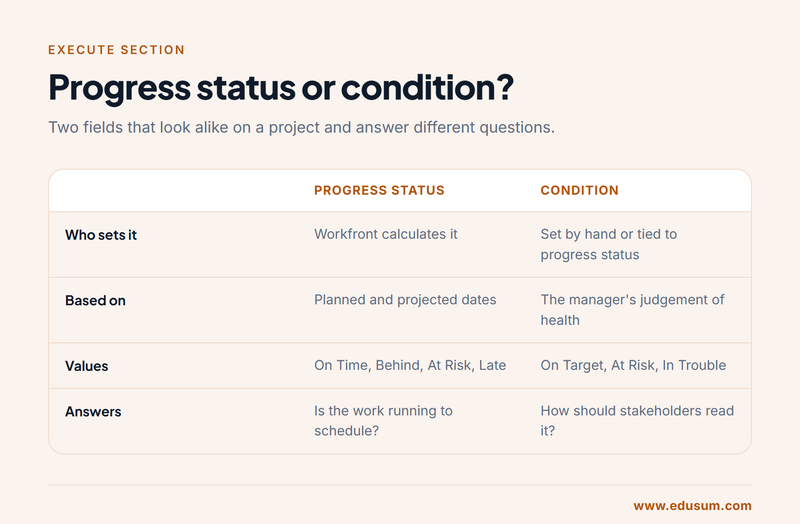
The pair most often confused is progress status and condition. Progress status is calculated by Workfront from dates and reads On Time, Behind, At Risk or Late. Condition is the health flag stakeholders see, On Target, At Risk or In Trouble on a project, and it can be set by hand or tied to the progress status. One is arithmetic and the other is judgement, and several questions turn on which of the two a described screen is showing.
People, teams and the Workload Balancer
Teams and groups do different jobs. A group reflects the organisation, such as a department or business unit, and is used to control who sees and administers what. A team is a set of people who do work together; tasks and issues can be assigned to a team and picked up by a member, and agile teams run their backlog from the team page. One objective asks how you find a project's team and notify it of assignments, updates or finished work, which points to the People area of the project and to tagging people or teams in an update.
The Workload Balancer inside a project shows unassigned work above and each person's allocated hours below, across the days or weeks you choose. You assign by dragging or by picking a user, and over-allocation is flagged so you can move work before someone is booked twice. The exam's wording is to assign resources efficiently, so read each scenario for the constraint that matters: availability, role or the date the work is due.
Proofs, methods, money and reports
The document objective is practical: upload a file to the project's Documents area and generate a proof from it, choosing a simple proof or an advanced one with an automated workflow of stages, reviewers and approvers. Know that comments and decisions are made on the proof and that a new version keeps the review history together.
The methodology objective asks which frameworks Workfront supports. Projects can be run in a traditional waterfall style with a predecessor-driven timeline, or in an agile style, where a team works from a backlog using Scrum iterations or a Kanban board. A single organisation can mix them, and tasks on a waterfall project can still be worked by an agile team.
Financial questions ask you to locate an element, not to do accounting. Planned and actual cost, planned and actual revenue and the budget are shown in the Finance part of Project Details, while expenses, billing rates and billing records each have their own section of the project. The last objective mirrors the one in intake: pick or build the dashboard and reports an execution persona needs, which means understanding that a report is defined by its object type, view, filter and grouping, and that a dashboard collects several reports on one page.
What does Closeout (10%) cover in only five questions?
Closeout is the smallest section, about five questions and two objectives, but both are easy marks for anyone who has finished a real project in the tool. The first objective asks which activities are triggered by an object's status. Status is not a label in Workfront; it changes behaviour. A project in Planning keeps its tasks out of assignees' work lists by default, and moving it to Current is what releases the work. A project set to Complete records its actual completion date, and with the automatic completion mode Workfront makes that change itself when the last task is finished. Dead marks work that was stopped without being finished. At task level, completing a task releases its successors, and resolving an issue can be tied to completing the task or project that was created from it.
The second objective asks which project elements measure success. The evidence is comparative: a baseline against final dates, planned hours against actual hours, budget against actual cost, milestones reached on their planned dates, and the performance indexes Workfront calculates for cost and schedule. A good answer names the element that fits what the stakeholder asked. A sponsor who asks whether the project stayed within its money wants budget and actual cost, not the count of completed tasks.
Is there an official Adobe practice test for the Workfront Project Manager exam?
Adobe's official preparation material for this exam is the free Adobe Workfront Project Manager Certified Professional Prep Guide, numbered EPG-E911 on the certification portal. Adobe describes it as covering the exam structure and the concepts in the exam, with resources tied to each objective. The portal also lists an Adobe course for this role. Those come from the organisation that writes the questions, so start with them.
EduSum's practice test is a different thing: an independent resource that is not produced or endorsed by Adobe. It exists for repetition under a clock. You sit timed sets of scenario questions mapped to the three sections, and the result history shows whether Intake and planning or Execute is costing you marks. The prep guide tells you what Adobe expects; timed practice shows whether you can deliver it at two minutes a question.
Avoid any site that claims to sell the live exam's questions. Using such material breaches the Adobe Candidate Agreement you accept at the start of the session, the answers are frequently wrong, and memorised answers fail the moment a scenario is reworded. Practice questions written against the published objectives teach the reasoning instead.
How should you prepare, and which mistakes cost the most marks?
Candidates who already manage projects in Workfront typically need three to four weeks of evening study. Someone new to the tool should plan for longer and must get hands-on access, because the questions describe screens and settings that are hard to picture from reading alone. Five steps cover the ground.
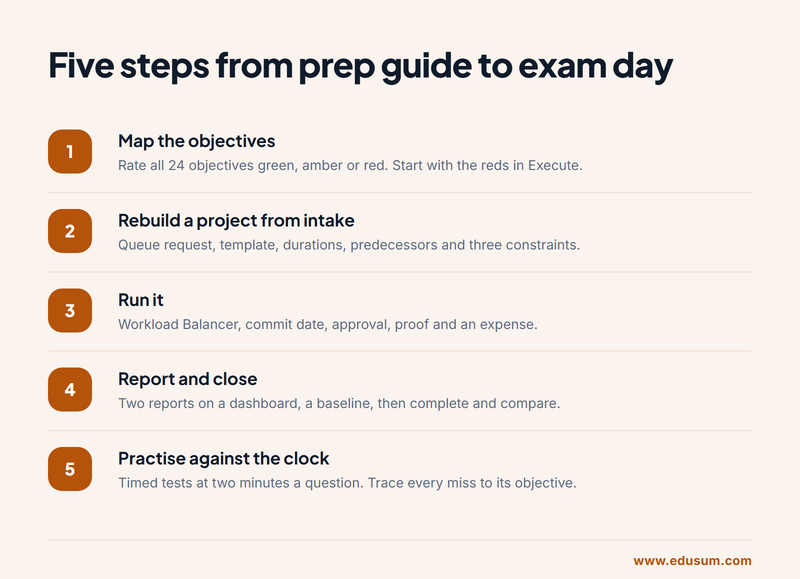
Step 1: map the objectives. Open the prep guide, list all 24 objectives and mark each one green, amber or red according to whether you have done it in a real project. Reds in Execute come first because that section is worth half the exam.
Step 2: rebuild a project from intake. In a sandbox or a test project, submit a request to a queue, convert it to a project from a template, and set durations, predecessors and at least three different constraints. Watch what each constraint does when you delay an earlier task.
Step 3: run it. Assign work in the Workload Balancer, enter a commit date as an assignee, add an approval, upload a document and create a proof, then log an expense. After each action, look at which dates and statuses changed and write down why.
Step 4: report and close. Build one report for intake and one for execution, place them on a dashboard, save a baseline, complete the tasks and close the project. Compare the baseline with the outcome.
Step 5: practise against the clock. Take full timed sets, then trace each miss to the objective behind it and repeat that action in the tool before you sit another set.
Across candidates, the same errors account for most lost marks:
- Mixing up planned and projected dates. Planned is your schedule; projected is the forecast.
- Treating condition and progress status as one field, when the first can be set by hand and the second is always calculated.
- Assuming a sharing permission can exceed the user's access level.
- Forgetting that a date-fixing constraint stops a task from moving with its predecessor.
- Using groups and teams interchangeably in assignment questions.
- Answering as an administrator who would rebuild the setup, when the question asks what a project manager would do with the setup as it is.
On exam day, read the last sentence of each question before the scenario. It tells you whether you are looking for a field, a setting, a location in the tool or an action, and that makes the relevant detail in the scenario easier to spot. Flag anything that takes longer than three minutes and return to it; with 17 answers to spare, an unanswered hard question hurts less than five rushed easy ones.
Where does the certification take your career?
This badge pays off mainly where an employer or its clients already run on Workfront. Common titles among holders include project manager, marketing operations manager, traffic manager, programme coordinator, PMO analyst and Workfront consultant at an Adobe partner. For partners, certified staff also support the firm's standing with Adobe, which is why consultancies often pay for the exam and expect it within the first months of a new hire.
Its value is specific, not general. It does not replace a broad project management qualification, and it does not claim to. What it adds is proof that you can apply sound project practice inside the tool a company has paid for. In organisations that use Workfront as their system of record for marketing and creative work, that combination is what hiring managers screen for, since a strong planner who cannot read the tool's dates still produces unreliable reports.
Adobe arranges its certifications in tiers, and Professional is the entry tier for a product. From here, people who enjoy configuration move towards the Workfront administration and developer credentials, while those who stay on the delivery side widen into the rest of Adobe's content supply chain, such as Experience Manager Assets or Adobe's marketing applications, where Workfront plans the work that those products publish.
Whichever direction you choose, keep the notes you made while preparing. The list of what each date means, what each status triggers and which permission allows which action is the same reference you will reach for when a stakeholder asks why a deadline changed, long after the score report has been filed.
Frequently Asked Questions
How many questions are on the Adobe Workfront Project Manager exam?
The exam has 50 questions and a time limit of 100 minutes, which Adobe's portal shows as one hour and forty minutes. That gives an average of two minutes per question. The questions are scenario based and written from the point of view of someone managing projects in Workfront.
What is the passing score for the Workfront Project Manager certification?
You need 33 correct answers out of 50 to pass. In practice that leaves room for 17 wrong answers. Because the Execute section holds about half of the questions, a weak result there is difficult to recover in the two smaller sections.
How much does the Adobe Workfront Project Manager exam cost?
The exam fee is US$125 as of October 2026. Moving your appointment is free until 24 hours before the start time and carries a five-dollar fee after that, and cancelling inside the final 24 hours forfeits the voucher, so set the date only once your preparation is on track.
Who is the Workfront Project Manager certification meant for?
Adobe lists it at Professional level for the Business Practitioners job role. It suits project managers, traffic managers, marketing operations staff and PMO analysts who plan and run work in Workfront day to day. It is not aimed at system administrators or developers.
Can I take the Workfront Project Manager exam from home?
Yes. The exam is delivered online with remote proctoring. You install Adobe's Process Tracker software, pass a System Check, show a valid photo ID, record a short room video and share your full screen. AI and human proctors monitor the whole session.
How do I renew an Adobe Workfront certification?
For most of its certifications Adobe offers a free renewal route: you pass two short modules, roughly a quarter of an hour apiece, and the credential is extended by two years. Sign in to the certification portal and use its renewal check to confirm what applies to yours.
- Adobe Certification |
- Adobe Workfront Certification |
- Adobe Workfront Project Manager Professional Certification |
- Workfront Project Manager Professional Practice Test |
- Workfront Project Manager Professional Study Guide |
- Workfront Project Manager Professional Certification Mock Test |
- Workfront Project Manager Professional Simulator |
- Workfront Project Manager Professional Mock Exam |
- Adobe Workfront Project Manager Professional Questions |
- Workfront Project Manager Professional |
- Adobe Workfront Project Manager Professional Practice Test |
- Workfront Project Manager Professional Books |
- Workfront Project Manager Professional Certification Syllabus |
- Adobe Workfront Project Manager Professional Training |
- Workfront Project Manager Professional Certification Cost |
- AD0-E911 |
- AD0-E911 Online Test |
- AD0-E911 Practice Exam |
- AD0-E911 Practice Test |
- AD0-E911 Questions |
- AD0-E911 Quiz |
- AD0-E911 Workfront Project Manager Professional |
- Adobe AD0-E911 Question Bank |
- Adobe Workfront Project Manager Certified Professional


